MiniMax H3
Open SiteAn independent MiniMax H3 video generator. Turn a prompt or a first-frame image into a 2K clip of 5, 10, or 15 seconds and follow progress in your browser, with official example prompts to learn from.
Added on November 10, 2026
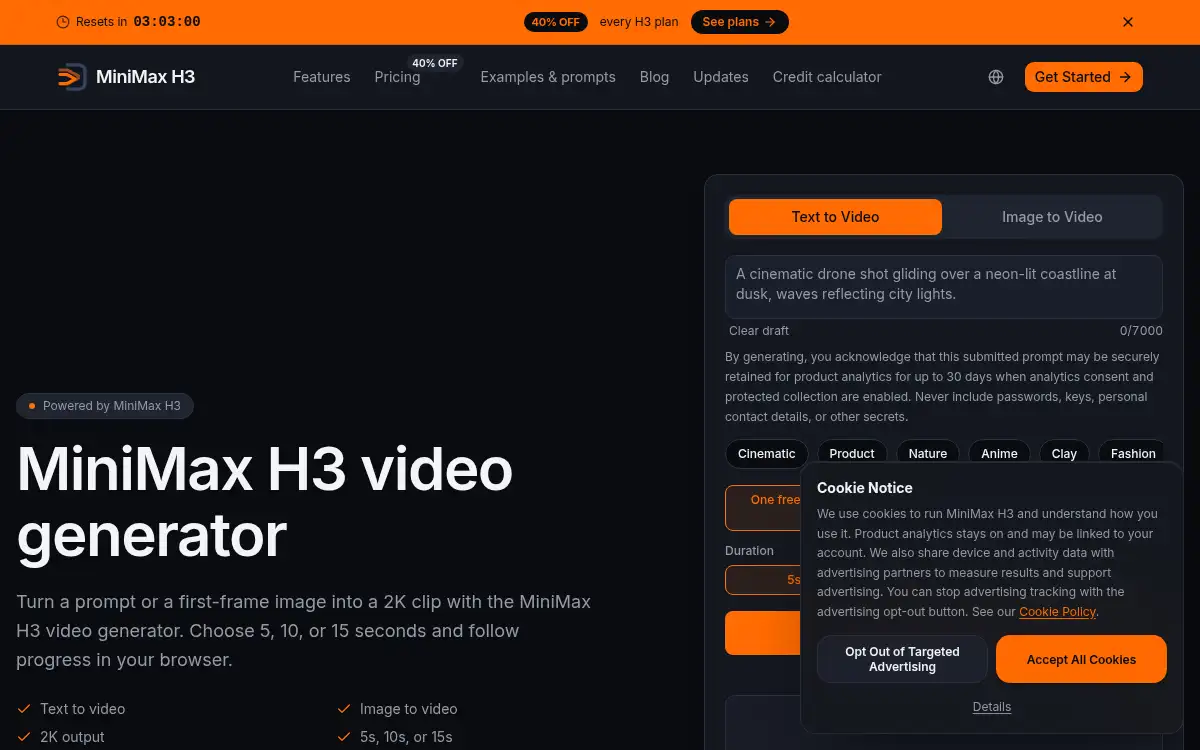
Product Information
What is MiniMax H3?
MiniMax H3 is an independent web front end for generating videos with the MiniMax H3 model. Users choose text-to-video or image-to-video, write a prompt of up to 7,000 characters or supply a first-frame image, then pick a 5, 10, or 15 second duration and an aspect ratio of 16:9, 9:16, or 1:1, with 2K output. Generation is credit-based, with the cost shown before you start and progress visible in the browser. The site also publishes official MiniMax H3 example clips with their prompts, a prompt-structure guide, a credit calculator, and plan pricing. It targets creators who want to try the model and learn prompting.
How to use MiniMax H3?
- 1. Open mini-max-h3.com and sign in
- 2. Choose Text to Video or Image to Video
- 3. Write a prompt or add a first-frame image, and pick a style preset if you like
- 4. Select 5, 10, or 15 seconds and an aspect ratio
- 5. Generate and follow progress in the browser, then download the clip
Core Features
- • Text and image to video — Start from a prompt or a first-frame image
- • 2K output — Clips of 5, 10, or 15 seconds
- • Aspect ratios — 16:9, 9:16, and 1:1
- • Official examples — H3 sample clips with the prompts attached
- • Credit calculator — See cost before generating
- • Style presets — Cinematic, product, nature, anime, and more
Use Cases
- • Creators testing the MiniMax H3 model
- • Marketers drafting short product clips
- • Social video makers needing vertical or square formats
- • Prompt writers learning from official example prompts
- • Teams estimating credit cost before a project