Dot Symbol
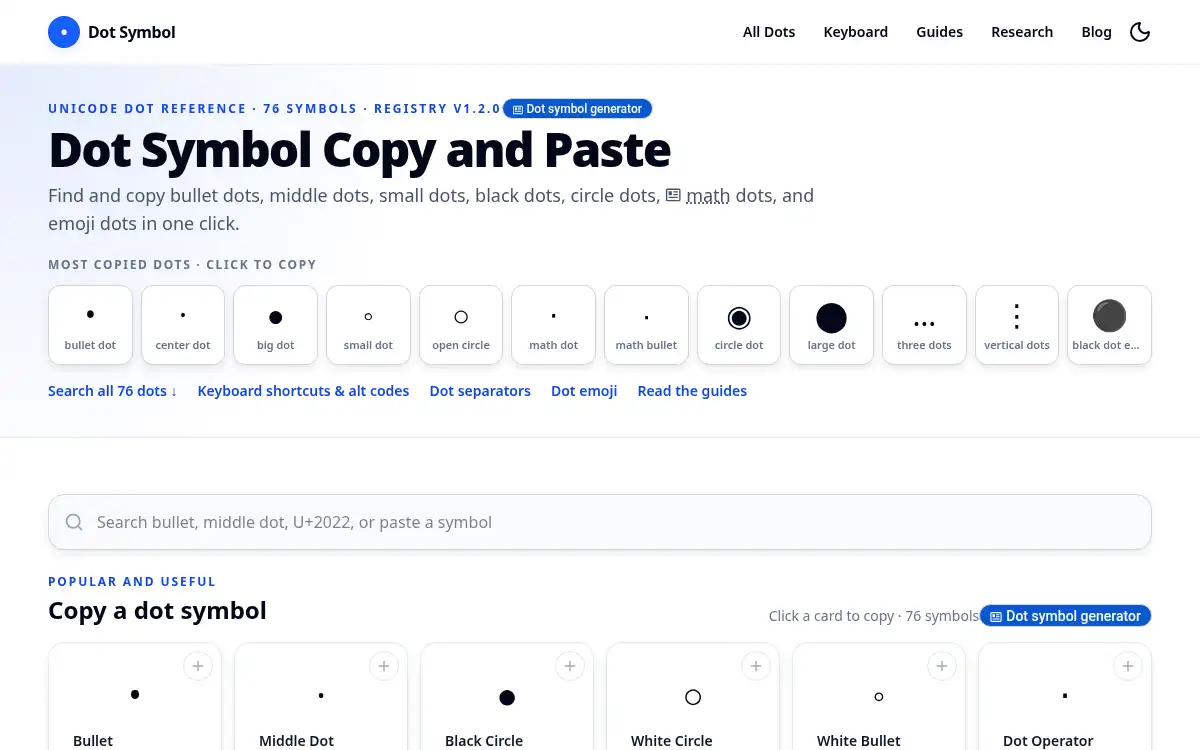
Open SiteDot Symbol is a free browser tool for finding, comparing, and copying bullet, middle, circle, math, multi-dot, and emoji dots. Click a character to copy it, then check its Unicode name, HTML or CSS codes, and keyboard guidance without creating an account.
Added on November 27, 2026
Product Information
What is Dot Symbol?
Dot Symbol (dot-symbol.com) is a free Unicode reference for dot characters. The homepage indexes 76 symbols—bullet dots, middle dots, small and large circles, mathematical operators, multi-dot punctuation, and colored circle emoji—and copies a character when you click its card, confirming only after the clipboard write succeeds. Similar-looking dots can be different code points, so the site groups them by shape and use and offers a look-alike comparison so you can check the official Unicode name before using a character in a formula or technical document. A Dot Separator Builder lets you add characters with no space, a single space, or a new line; emoji and multi-code-point sequences stay intact. Recently Copied, pinned dots, and Builder text stay in the browser's localStorage only. Indexed guides cover Windows, macOS, mobile, Word, HTML, CSS, and JavaScript entry methods, and no account is required.
How to use Dot Symbol?
- 1. Open dot-symbol.com and browse the 76-symbol grid, or jump to a category such as Bullet, Middle & Center, Math, Multi-dot, or Emoji
- 2. Click a card to copy the character; the site confirms “Copied” only after the clipboard write succeeds
- 3. If two dots look alike, open Dot Compare and check the Unicode name and code point before pasting into a formula or identifier
- 4. Use “Add to Builder” on any card to assemble a separator with no space, a single space, or a new line, then copy the result
- 5. Open a character’s guide or the keyboard page when you need HTML entities, CSS or JavaScript escapes, or OS-specific shortcuts
Core Features
- • One-click copy for 76 dots — Click a card to copy a bullet, middle, circle, math, multi-dot, or emoji character, with confirmation after a successful clipboard write
- • Categories by shape and use — Browse Popular, Middle & Center, Bullet, Small, Big, Circle, Math, Multi-dot, and Emoji groups (a character may appear in more than one)
- • Look-alike comparison — Check official Unicode names and code points when a middle dot, dot operator, and bullet operator look similar but are not the same character
- • Dot Separator Builder — Add characters with no space, a single space, or a new line and copy the string, keeping emoji and multi-code-point sequences intact
- • Local-only history — Recently Copied, pinned dots, and Builder text stay in localStorage; nothing is sent to a server, and Recently Copied holds at most ten values
- • Keyboard and code guides — Each indexed guide includes Windows, macOS, mobile, Word, HTML entity, CSS escape, and JavaScript escape notes
- • Practical writing help — Linked guides cover list bullets, compact separators for labels and bios, and colored circle emoji for status or decoration
Use Cases
- • Copy a true bullet character for a plain-text list instead of guessing from a character map
- • Build a compact middle-dot separator for a bio, navigation label, or metadata line
- • Check whether a math formula needs a middle dot, a dot operator, or another look-alike code point
- • Copy a colored circle emoji or geometric circle when you need a status marker
- • Look up the HTML entity, CSS escape, or keyboard shortcut for a specific dot without leaving the browser