Wallpaper Maker AI
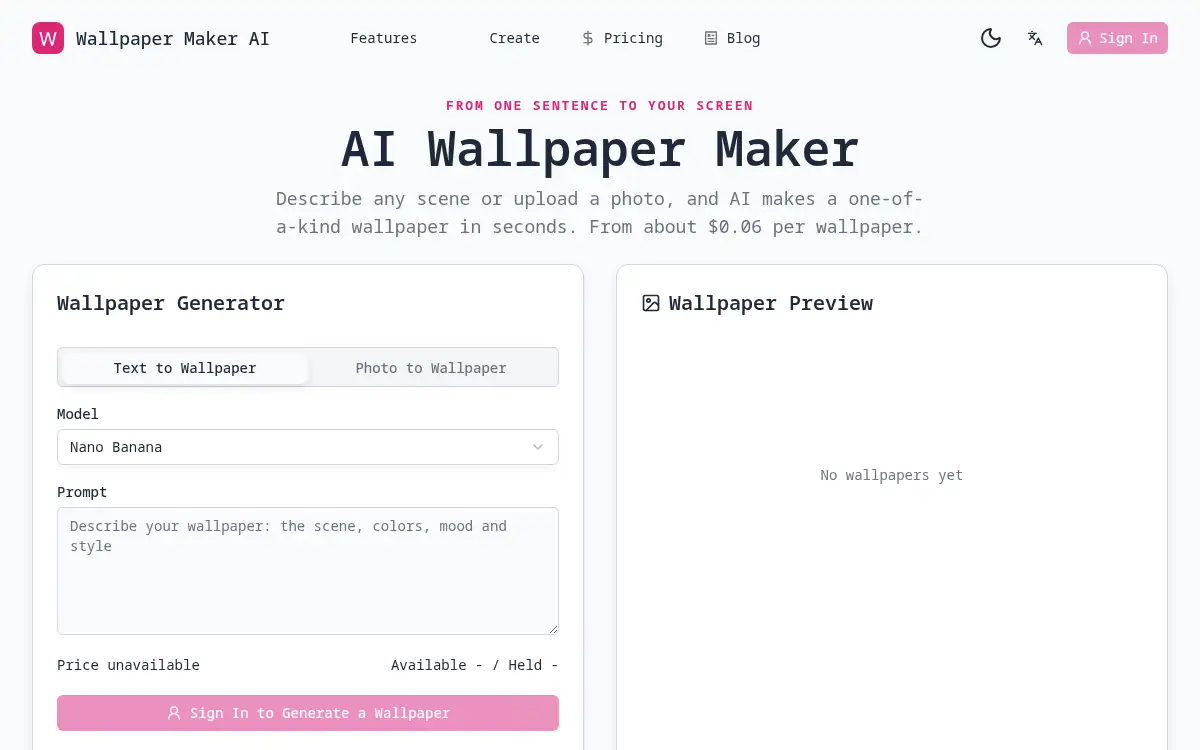
Open SiteWallpaper Maker AI turns a short description, or a photo plus a description, into an original wallpaper for a phone, tablet, or computer. You pick one of five AI image models, confirm the credit price, and download the result; there is no free tier.
Added on November 27, 2026
Product Information
What is Wallpaper Maker AI?
Wallpaper Maker AI (wallpapermakerai.com) is an online generator that turns a short description, or a photo plus a description, into an original wallpaper. You can start from text, or switch to Photo to Wallpaper and upload up to eight images (each up to 5 MB). Five models are offered: Nano Banana, Nano Banana 2, and Nano Banana Pro (Google), GPT Image 2 (OpenAI), and Grok Imagine (xAI, text prompts only). Text wallpapers cost 15, 35, or 75 credits and photo wallpapers 35, 55, or 95, depending on the model, and the exact price is shown before you confirm. There are no free credits. Credits are purchased through FloatPass; the site documents a $19 one-time top-up for 4,750 credits, and new monthly subscriptions are no longer offered. Most wallpapers are ready in seconds, past results stay in My Creations, and a confirmed failure returns the original credit charge. The generator has no size control, so you may need to crop the image on your device.
How to use Wallpaper Maker AI?
- 1. Open wallpapermakerai.com and sign in—generation requires an account and credits; there is no free wallpaper
- 2. Choose Text to Wallpaper or Photo to Wallpaper; for a photo wallpaper, upload up to eight images and say what should be kept or changed
- 3. Write a short prompt covering the subject, a few colors, the lighting or mood, and a style word if you want one, plus a calmer area if you need room for a clock or icons
- 4. Pick a model, check the exact credit price next to the button, and confirm the generation
- 5. Download the image when it is ready, crop it on your phone or computer if needed, and find earlier wallpapers later in My Creations
Core Features
- • Text-to-wallpaper — Describe a scene, mood, and style in a sentence or two and generate a one-off wallpaper
- • Photo-to-wallpaper — Upload up to eight photos (up to 5 MB each) and describe what should stay, such as a face or skyline, and what should change
- • Five AI image models — Nano Banana, Nano Banana 2, Nano Banana Pro, GPT Image 2, and Grok Imagine (text only); the other four also accept photos
- • Per-generation pricing — Text wallpapers are 15, 35, or 75 credits and photo wallpapers 35, 55, or 95, with the exact price confirmed before you run it
- • FloatPass credits — Pay per wallpaper with no new monthly subscription; the site documents a $19 top-up for 4,750 credits
- • My Creations history — Signed-in results can be reviewed and downloaded later; there is no public gallery of uploads or wallpapers
- • Failed-job handling — A confirmed failure returns the original credit charge, and a still-running job can be resumed instead of restarted
Use Cases
- • Make a one-of-a-kind phone or desktop wallpaper from a short scene description instead of browsing a stock library
- • Reimagine a favorite photo—such as a pet or a skyline—in a new season, style, or background
- • Ask for a calmer area at the top or center so a clock, widgets, and app icons stay readable
- • Compare the same prompt on a lower-cost model and a higher-cost one before spending more credits
- • Resume a generation that is still pending, then download it later from My Creations